
 BLOG
BLOG
GNSS workflows for residential construction: a phase-by-phase guide
GNSS can support a residential project from the first site visit through final acceptance. Crews can use it to check existing conditions, verify grades and elevations, lay out work, capture utilities before backfill, and document the finished site. The collected data can also support inspections, as-built documentation, project handoff, and warranty claims.
Some work still requires a licensed surveyor or engineer, such as site calibration, boundary determination, certified stakeout, and sealed as-built deliverables. Between these stages, GNSS allows crews to perform routine checks and collect supporting data themselves.
This article follows a typical residential construction lifecycle, from site development and grading through individual lot construction, final acceptance, and post-close documentation. It shows where Reach receivers and the Emlid Flow ecosystem can support fieldwork and quality control at each stage.
- Key takeaways
- Getting centimeter accuracy on site
- Who uses GNSS on a residential construction team?
- Phase 1: Check site conditions during land acquisition
- Phase 2: Verify site and lot grading
- Phase 3: Verify house layout and pad elevations
- Phase 4: Capture utilities before backfill
- Phase 5: Collect data for final grade and acceptance
- After project close: Keep a reliable project record
- Using Reach RS4 Pro across the build
- Start with one workflow
- Frequently asked questions
Key takeaways
- Centimeter accuracy takes a minimal setup. Use a base and rover pair, or a single Reach rover with Emlid Corrections. Emlid Flow covers stakeout, cut and fill checks, and point collection.
- GNSS doesn’t require extensive surveying experience. Superintendents can run grade and pad checks, while field engineers and VDC teams collect utility and as-built data.
- One rover supports the whole build. The same Reach receiver can check site conditions, verify grades and layout, capture utilities before backfill, and collect final grade data.
- Some work still belongs to a licensed surveyor. Boundaries, site control, certified stakeout, and sealed as-built deliverables stay with the professional, while crews handle routine checks in between.
- Store context along with measurements. Keep the coordinate reference, collection date, feature descriptions, and photos together so the data stays useful after handoff.
Getting centimeter accuracy on site
You don’t need extensive surveying experience to use GNSS for many day-to-day construction tasks. With an RTK receiver, you can locate design points, check grades, document installed utilities, and monitor work as construction progresses—all with centimeter-level accuracy.
An RTK system traditionally uses two GNSS receivers: a base and a rover. Both track signals from multiple satellite constellations, such as GPS, GLONASS, Galileo, and BeiDou. The base stays at a known location and sends its satellite observation data to the rover.
Because both receivers observe the same satellites at the same time, the rover can account for errors common to both and calculate its position with centimeter-level accuracy in real time.
With a compatible Reach receiver, you can instead use Emlid Corrections. The service provides RTK corrections through the internet and is integrated directly into Emlid Flow. Activate the service, connect your Reach receiver, and once it obtains an RTK FIX, you’re ready to start measuring with centimeter-level accuracy.
Related reading: Reach receivers now have built-in RTK corrections
From there, Emlid Flow provides the tools you need for common field tasks. You can load project data, stake out design points and lines, check cut and fill against a design surface, and collect accurate positions of completed work. If several people are working on the same project, Emlid Flow 360 can keep project data synchronized between the office and field.
This doesn’t replace a licensed surveyor where certified survey work is required. But for many routine construction tasks between those milestones, your own crew can use RTK to take accurate measurements and check work without bringing a surveyor to the site every time.
Who uses GNSS on a residential construction team?
GNSS can support different roles as a residential project moves from site preparation to individual lot construction and final documentation:
- Superintendents can perform routine grade and pad checks, verify rough-grade readiness, and confirm that work remains consistent with established layout.
- Field engineers or VDC teams can collect structured utility and as-built data, organize field records, and prepare information for office workflows and final deliverables.
- Surveyors establish control and perform boundary, certified stakeout, and other professional surveying work required by the project or jurisdiction.
The goal is not to shift professional surveying responsibilities to the construction crew. Instead, GNSS gives field teams a practical way to perform routine checks and collect project data without requesting a survey visit for every task.
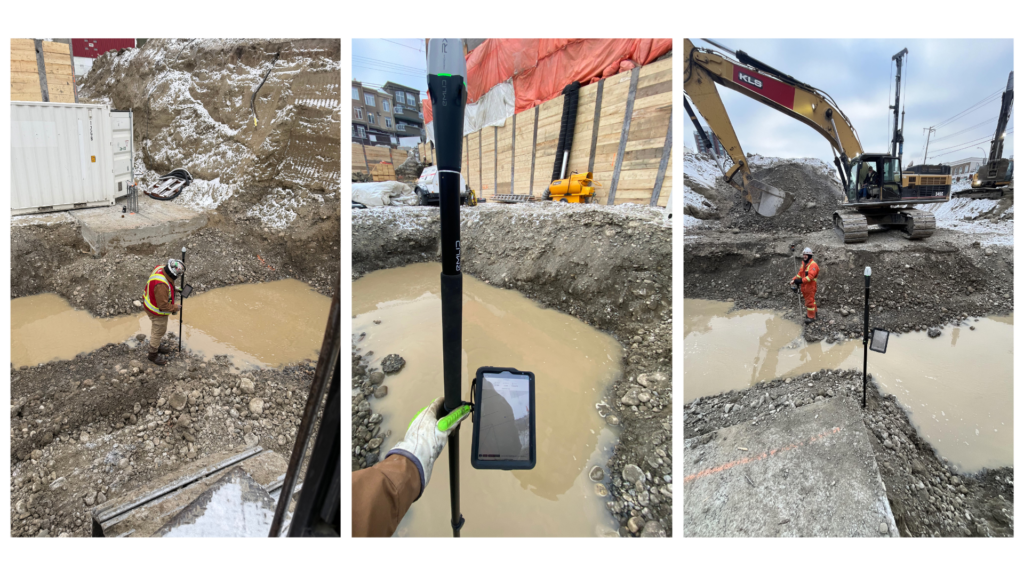
KLS Earthworks shows one example, with GNSS rovers used directly by supervisors for routine fieldwork.
Phase 1: Check site conditions during land acquisition
Before committing to a lot or starting detailed design, Reach receivers can help you collect current field information about the site. These initial site checks can provide useful information for planning and early project decisions, but they do not replace a professional boundary or topographic survey.
This way, a crew can walk the property and capture features such as:
- Existing terrain.
- Drainage features.
- Tree lines.
- Visible utilities.
- Access points and other site constraints.
These measurements can help compare actual site conditions with the information used during preliminary planning. Unexpected slopes, drainage conditions, or access constraints can then be identified before construction begins.
Work related to property boundaries, easements, and other legally defined property features typically requires a licensed surveyor, although requirements vary by jurisdiction. The licensed surveyor remains responsible for establishing and certifying the legal survey information required for the project.
Phase 2: Verify site and lot grading
Once earthwork begins, crews can use GNSS to compare actual terrain against the grading design without waiting for a separate survey visit for every routine check.
This is particularly useful while earthmoving equipment is still on site. If a grade is outside tolerance, the crew can identify and correct it before moving to the next construction stage.
Related reading: See how GNSS helps earthworks planning and progress tracking
Checking rough grade before review or inspection
Before requesting a rough-grade inspection, your team can use Reach receivers to check the features specified in the grading plan, such as:
- Lot elevations.
- Swales and drainage paths.
- Pad elevations.
- Other critical grade points.
These checks give the construction team an opportunity to identify deviations before submitting the work for review.
Documenting fill where required
Fill beneath footings and other structural areas may be subject to project-specific geotechnical, compaction, monitoring, or certification requirements. Where appropriate, GNSS measurements can document elevations at specified stages or lifts and provide position records for the professional responsible for reviewing or certifying the work.
Requirements vary considerably by project and jurisdiction, so follow the applicable geotechnical specification and local requirements.
For more on field verification, see our guide to QA/QC workflows on construction sites.
Phase 3: Verify house layout and pad elevations
As the building moves from earthwork to foundation construction, GNSS can help crews verify that field conditions continue to match the design. Depending on the project and local requirements, crews can use a Reach rover to:
- Recover previously established points or offsets.
- Check pad elevation.
- Verify dimensions and offsets against the design.
- Confirm that established layout has not been disturbed.
- Perform routine checks between surveyor visits.
GNSS provides an independent coordinate-based check instead of relying only on measurements carried forward from stakes, strings, or previously marked references.
However, some projects or jurisdictions require particular layout or stakeout work to be performed or certified by a licensed surveyor. In this case, the surveyor establishes and certifies the required positions, while the construction crew can use GNSS for routine verification between professional survey visits.
The exact division of responsibility depends on local regulations and project requirements.
Phase 4: Capture utilities before backfill
Utility installation creates one of the shortest opportunities for collecting useful as-built information. Once a trench is backfilled, the actual location and elevation of the installed infrastructure become much harder to verify.
Before covering the installation, collect the features required for the project record. These may include:
- Installed utility alignment.
- Connections and fittings.
- Service laterals.
- Cleanouts.
- Meter locations.
- Invert or top-of-pipe elevations where required.
Capturing these features while they are exposed creates a direct record of where the infrastructure was installed. The data can later support as-built drawings, maintenance, future excavation, and project handoff.
Photos and descriptive attributes can also be associated with surveyed features where the field workflow supports them, preserving additional context about what was installed. See our utility and wet utility workflow guide for the complete workflow.
Phase 5: Collect data for final grade and acceptance
By final grade, much of the information needed for the project record should already have been collected during the previous phases. Depending on municipal and project requirements, final or as-built documentation may need to include features such as:
- Lot corner elevations.
- House pad elevations.
- Swales and emergency overflow paths.
- Retaining wall top and bottom elevations.
- Drainage structure rim and invert elevations.
The exact requirements vary by jurisdiction, development agreement, and project. Confirm the required features and deliverable format with the reviewing authority.
Collecting this information throughout construction reduces the amount of fieldwork needed at the end. Instead of reconstructing buried or modified conditions after completion, the project team already has measurements from the stages when those features were accessible.
Final acceptance may require an as-built drawing, grade certificate, or another deliverable prepared or sealed by a licensed surveyor or professional engineer. Builder-collected measurements do not replace the required professional certification.
They can, however, provide an organized record of the work completed throughout construction and support the professional preparing the final deliverable.
For more on collecting and transferring as-built data, see our as-built survey guide.
After project close: Keep a reliable project record
The value of field measurements does not end when construction is accepted. Drainage, grading, and utility questions can arise after handoff. Measurements collected during construction provide a dated record of site conditions at specific stages of the project.
For example, elevation measurements collected at rough grade and again at final grade can be compared with the approved design if a drainage concern is raised later. Instead of relying only on observations made after the site has changed, the project team has measurements showing the conditions recorded during construction.
For these records to remain useful, store them centrally with enough context to interpret them later. Keep the project information, coordinate reference, collection date, feature descriptions, and any relevant photos together with the measurements.
This documentation can support the investigation of a later issue, although it does not by itself determine responsibility or the outcome of a claim.
Using Reach RS4 Pro across the build
A receiver used throughout the residential construction lifecycle needs to handle more than straightforward point collection.
Reach RS4 Pro combines RTK positioning with tools that can help in different phases of the workflow:
- Tilt compensation helps collect points where keeping the pole vertical is difficult, such as around building corners, swales, and utility features.
- AR stakeout provides visual guidance when navigating to design points and other locations in the field.
- Visual Capture lets you measure points from photos when placing the pole directly on the feature is difficult or unsafe, such as near an open trench.
- Multiple correction options let crews work with Emlid Corrections, other NTRIP services, or a local Reach base over LoRa or UHF depending on site conditions.
- Emlid Flow and Emlid Flow 360 connect field and office workflows so collected measurements can be organized and accessed throughout the project.
The same rover can therefore move with the project—from initial site measurements to grade checks, layout verification, utility capture, and final documentation—while the field data remains part of the same project workflow.
For more on Reach RS4 and RS4 Pro in construction, see our construction overview.
Start with one workflow
You don’t need to introduce GNSS across the entire construction lifecycle at once. Start where additional field verification or documentation solves an immediate problem.
Grade checks and utility capture before backfill are practical starting points because crews can use the measurements immediately to verify work or preserve information that may become inaccessible later.
Once the workflow is established, the same Reach receiver and Emlid Flow project can support additional tasks as construction progresses. If you want to see how this workflow could fit your projects:
Frequently asked questions
Yes. Construction crews can use GNSS for routine grade checks and verification. However, a grading certificate, as-built survey, or other official deliverable may need to be prepared or sealed by a licensed surveyor or professional engineer. Requirements vary by jurisdiction and project.
Check that the GNSS project and grading plan use the same coordinate system and vertical datum. A common cause is comparing GNSS ellipsoidal heights with elevations referenced to an orthometric vertical datum such as NAVD88. Confirm the project control, horizontal coordinate system, and vertical datum with the survey or design team before collecting field data.
Not necessarily. A rover can receive RTK corrections from a network correction service, or a local base can serve a larger project area where radio or internet connectivity allows. Whichever correction method you use, make sure the resulting measurements are referenced to the project control and coordinate system.
Rough-grade checks are performed earlier in construction to verify elevations and drainage before the project moves to the next stage. Final-grade checks verify the completed grading and drainage conditions. The required measurements, inspections, and deliverables vary by project and jurisdiction.
Capture the features required by the project, which may include utility alignments, connections, fittings, laterals, cleanouts, meter locations, and pipe elevations. Collecting these measurements while the installation is exposed avoids having to reconstruct its location later.
Keep the measurements that may be needed to understand the completed site later, such as lot, pad, swale, drainage, and utility data. Store them with the project coordinate reference, collection dates, feature information, and relevant photos so the measurements can still be interpreted after the original field crew has moved on.
How ASCE 38 quality levels work with RTK GNSS for utility mapping
The utility trench as-built survey checklist: what reviewers look for before they approve
Customer story: what happens when superintendents get survey-grade tools
Customer story: How Dellbrook cut rework on the job site with GNSS for superintendents